Working with the Lavender Floral Wreath in Everyday Creative Projects
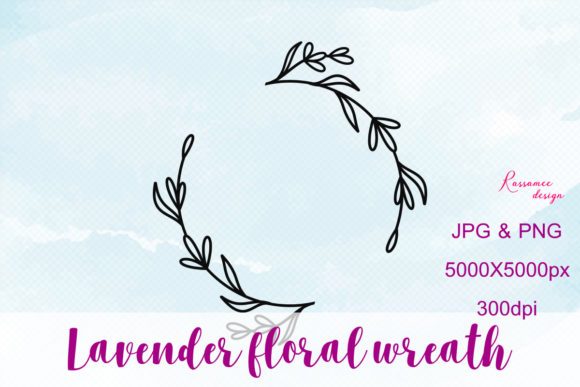
When you download a high-resolution botanical asset like the Lavender Floral Wreath, you receive more than just a decorative image. You get a versatile design resource structured for immediate use across nearly any graphic editing environment. The package includes a JPG and a PNG file, both sized at 5000 by 5000 pixels and set to 300 dots per inch. That resolution and density mean the wreath can hold its clarity on large-format printed pieces or scale down cleanly for smaller digital placements without visible degradation. The transparent PNG version, in particular, removes the friction of manual background removal and lets you layer the wreath directly onto existing layouts, photos, or textured backdrops.
Botanical wreaths have long been a staple in stationery, branding, social content, and interior decor mockups. What makes a lavender-focused version distinct is the plant's visual association with calm, seasonal transition, and a certain understated elegance that suits both rustic and polished aesthetics. The practical value lies in how quickly you can reach for this file during a project, align it with your working document, and let it function as a framing device, a logo enclosure, or a standalone decorative focal point. The file format choices reflect a sensible balance: the JPG offers a compressed, print-ready version for straightforward placement, while the PNG preserves transparency for more complex compositing work.
What the Asset Provides Before Editing Begins
One often overlooked part of a smooth design process happens before any actual editing takes place: asset selection and verification. With the Lavender Floral Wreath, you start with clear specifications that eliminate guesswork. The 5000-pixel square canvas gives you a generous working area that exceeds the requirements of most common document sizes. At 300 DPI, the file aligns with standard print production workflows, so you do not need to upsample or interpolate pixels before sending a project to a commercial printer. This matters when you are building materials like event invitations, product labels, or signage where fine detail retention separates professional output from visibly compromised work.
Having both a flat JPG and a transparent PNG in the package also means you can make format decisions based on your software and your end goal. Some older or lightweight editing programs handle JPG files more efficiently for basic edits. More capable applications like Adobe Photoshop, Affinity Photo, GIMP, or Canva Pro benefit from the PNG's transparency channel, which lets the wreath sit above other layers without a white box behind it. This dual-format approach is a quiet but meaningful time-saver. You are not converting file types or troubleshooting unwanted backgrounds when a deadline is approaching.
Fitting the Wreath into Your Creative Workflow
In practice, a lavender wreath asset integrates into several stages of a creative or business workflow. During the planning stage, you might place the wreath into a mood board or rough layout to test how botanical framing works with your emerging concept. Because the file is high-resolution, you can crop into a section of the wreath—perhaps just the upper left cluster of lavender stems—and still have enough pixel data for a sharp result. This cropping flexibility expands the asset's range without requiring additional purchases or custom illustration work.
During active design, the wreath often serves as a compositional anchor. Consider a small business owner creating a promotional graphic for a spring product line. Placing the Lavender Floral Wreath behind a central product photo immediately adds depth and seasonal context. If the composition needs breathing room, the wreath's circular arrangement naturally draws the eye inward, which is why many designers use floral wreaths around logos, quotes, or discount offers. The center negative space invites text or focal imagery without forcing the wreath to compete for attention.
After the main design phase, the asset also supports revision and repurposing. A version created for an Instagram post can be adapted into a square newsletter header or a rectangular printed flyer by repositioning and scaling the wreath slightly. Because the file is raster rather than vector, you do need to keep scaling within reasonable limits, but the initial 5000-pixel dimension provides ample buffer before quality loss becomes noticeable. This adaptability supports a multi-channel publishing approach where a single well-chosen asset appears across several outputs, maintaining visual consistency without repetitive manual work.
Software Compatibility and Integration Realities
The description states that you can use this design with almost any graphic program, and that claim holds up when you consider the broad compatibility of JPG and PNG formats. From professional suites like Adobe Illustrator and CorelDRAW to browser-based tools like Canva and PicMonkey, both file types import without special plugins or conversion steps. Even presentation software such as PowerPoint or Google Slides can host the transparent PNG effectively, which opens up possibilities for educators, speakers, and corporate communicators who want to elevate slide decks beyond default templates.
However, there is an important distinction between opening a file and using it well. Programs that support layering and blending modes unlock more sophisticated results. In Photoshop or Affinity Photo, you can adjust the PNG wreath's opacity, apply subtle drop shadows, or tint the lavender hues using adjustment layers without permanently altering the original pixels. In layout-focused tools like Adobe InDesign, linking the transparent PNG allows for non-destructive placement within multi-page documents like brochures, catalogs, or annual reports. For users working primarily in vector environments, the JPG or PNG can serve as a reference for tracing or as a placed image within a larger composition that includes vector text and shapes.
One practical observation for long-term use: keep your original downloaded files untouched. Make a habit of duplicating the file before editing, or work with the asset as a linked or placed object rather than embedding it directly in early drafts. This small organizational practice preserves the source quality for future projects that may have different resolution or color requirements.
Use Cases That Reflect Real Work
Creative professionals, marketers, and small business owners encounter situations where a floral wreath solves a recurring visual problem: how to frame content attractively without commissioning custom illustration each time. The Lavender Floral Wreath works particularly well when you need a soft, organic border that does not overwhelm the message. Wedding stationery designers use similar assets for save-the-date cards and table number signs. Bloggers and content creators layer them beneath text overlays for Pinterest graphics and featured images. Product photographers sometimes place printed versions of such designs around physical items during flat-lay shoots, though the digital file can also be added in post-production for a cleaner, more controlled result.
Another application appears in brand identity projects where a secondary botanical mark supports the primary logo. A lavender wreath that frames an initial letter or monogram can become a recognizable sub-brand element used on packaging, thank-you cards, or social media avatars. The consistency of using the same high-resolution file across all these touchpoints strengthens visual identity without requiring an extensive custom illustration budget.
For those working in learning and development or internal communications, the wreath can soften corporate templates without undermining professionalism. A training certificate, an event program cover, or a recognition award design benefits from decorative framing that feels intentional rather than clip-art generic. The lavender's specific color palette—muted purples alongside green foliage—also pairs well with neutral backgrounds like cream, gray, and soft beige, which are common in modern brand guidelines.
Organizing and Preparing the Files for Team Use
If you work within a team or share assets across multiple collaborators, establishing a clear naming convention and folder structure from the start eliminates confusion later. The downloaded files may arrive with generic names. Rename them to something descriptive, such as Lavender_Floral_Wreath_Transparent_5000px.png, so that colleagues or clients can immediately understand what they are accessing without opening the file. Store the original versions in a shared asset library or cloud folder with read-only permissions to prevent accidental overwrites.
For designers who maintain asset libraries within Creative Cloud, Dropbox, or Google Drive, adding a simple text file with metadata—dimensions, DPI, color profile, licensing terms—alongside the wreath files can save future you from digging through old emails or purchase receipts to confirm usage rights. This small documentation habit aligns with broader practices around digital asset management and reflects a mature, process-aware approach to creative work.
Quality Control and Consistency Considerations
At 5000 pixels square and 300 DPI, the wreath provides a robust foundation, but quality control still benefits from a few checks before final export. If your project requires a very specific color match—for instance, aligning the lavender tones with an established brand palette—use the eyedropper or color picker tool in your software to sample the wreath's purples and compare them against your brand's hex or CMYK values. If adjustment is needed, a selective hue adjustment in Photoshop or similar tools can shift the lavender toward cooler or warmer tones without affecting the green foliage.
For print projects, confirm that your document's color mode matches the output intent. The wreath likely arrives in an RGB color space, which suits digital screens but may shift when converted to CMYK for offset or digital printing. Soft proof the file in your design application to anticipate any color shifts and decide whether a slight saturation boost or manual conversion best preserves the intended look. These steps fall under routine prepress quality control but are worth mentioning because floral assets with subtle color gradients can lose their nuance if conversion is handled carelessly.
Long-Term Value and Repurposing Across Projects
An asset like the Lavender Floral Wreath generates long-term value when you treat it as part of a reusable visual toolkit rather than a one-off download for a single project. After the first successful use, the file becomes familiar material. You learn how it behaves under different blending modes, which crops look balanced, and how much text it can comfortably frame. That accumulated micro-knowledge speeds up future work. A social media manager who uses the wreath across three campaigns develops an intuitive sense of placement that reduces trial and error. A stationery designer who incorporates it into multiple client projects learns exactly which file format to reach for when a specific print method is requested.
The fact that no mockup is included in the package actually clarifies the asset's role. The wreath is a raw design element, not a pre-composed scene. This separation aligns with how many experienced creators prefer to work: source high-quality individual components, then combine them according to the specific demands of each project. You supply your own background textures, product images, and typography, giving the wreath a context that matches your unique needs rather than a generic preset. This modular approach supports creative flexibility and prevents the repetitive look that can emerge from overused mockup templates.
Practical Integration Tips Without Overcomplication
For a smooth integration, start with the transparent PNG in a layered document. Place the wreath on its own layer above your background and below your primary text or focal imagery. If the wreath feels too prominent, reduce its opacity to 70-85% or experiment with the "multiply" or "soft light" blend modes, which can help the botanicals settle more naturally into certain backgrounds. When working with dark backgrounds, a slight outer glow or a subtle lightening of the wreath layer can maintain visibility without harsh contrast.
If you are more comfortable with template-based tools like Canva, upload the PNG version to your media library and drag it into your design. Canva's transparency support means the wreath will sit cleanly above colored backgrounds, photos, or shapes. From there, you can use Canva's built-in adjustment tools to tweak brightness and saturation or add a soft shadow for depth. The point is that the asset does the heavy lifting on the illustration side, while you retain full control over how it integrates into your broader layout.
For those who regularly produce content for multiple platforms, consider creating a small set of pre-cropped or pre-positioned versions of the wreath at common aspect ratios—square, portrait 4:5, and landscape 16:9. Save these as template files in your design software of choice. When a content request arrives, you open the template, insert the new text or image, and export. The upfront time investment pays off in daily efficiency gains, especially during busy seasons or product launches.
Why a Single Botanical Asset Supports Better Workflow Thinking
On the surface, the Lavender Floral Wreath is a simple decorative graphic. Beneath that surface, choosing and effectively using an asset like this reflects a broader approach to resourceful design work. You evaluate the specifications beforehand, confirm compatibility with your tools, slot the asset into your existing process, adapt it to different outputs, and maintain quality through informed preparation. These habits transfer to other design decisions and become part of a reliable, repeatable creative practice. The asset itself does not determine the quality of the outcome; how you position, scale, color-correct, and combine it with other elements does.
Having access to a high-resolution, transparent botanical in a widely compatible format removes a common friction point from visual projects. Whether you are a marketer preparing a seasonal campaign, a small business owner refreshing product packaging, or an educator creating engaging learning materials, the Lavender Floral Wreath slots into your workflow as a ready-to-use component. Over time, it earns its place in your asset library not through novelty but through consistent, dependable utility across varied and evolving project demands.